
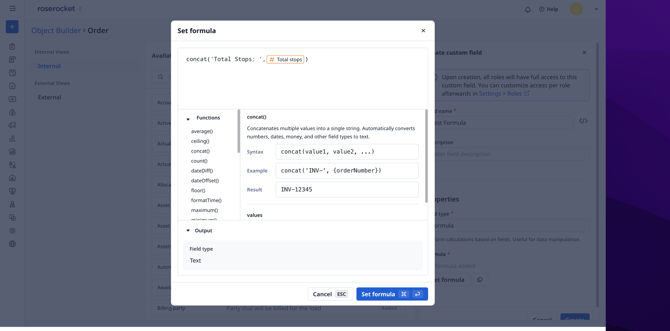
🧮 Formula Fields: Concat & Format Time
Build custom fields that combine text and format timestamps — no spreadsheet required.
Why this matters:
- Display shipper + consignee in a single column, make your own unique IDs for client orders, and more without creating manual data entry steps
- Convert raw timestamps into readable times your dispatchers and drivers actually use
- Build more expressive board views and widgets without adding clutter to your underlying orders
🔧 Learn how to use Formula Fields
🔗 Custom Field Dependency Check
Before you delete a custom field, see exactly what breaks — then decide with full context.
Why this matters:
- Catch silent breakages before they reach customers
- Know which widgets, automations, and workflows depend on a field before removing it
- Build and refine your custom setup with confidence as your configuration grows
Before: Delete a field → workflows silently break → you find out when a customer complains about missing data.
After: Delete a field → see "This field is used in 3 widgets and 1 automation" → make an informed decision.
How to use: Object Builder → Custom Fields → click Delete on any field → review the dependency list before confirming.
🔧 Learn about custom field management
✉️ TED: Control Your Initial Email Ingest
Choose how far back TED looks when connecting a new email account — so your first sync is clean, not chaotic.
Before: TED processed your entire inbox history on first sync — could take hours and surface orders from years ago.
After: Set how far back TED ingests before connecting — last 7 days, 30 days, or all time.
How to use: Settings → Connected Email Settings → Connect Email → set Initial ingest volume before confirming.
🛠️ Custom Widgets Close Automatically
Your widgets now mark themselves done and close as fields get populated — fewer clicks, faster dispatch.
Why this matters:
- Less manual clicking to mark widgets complete as you enter data
- Your team moves through order entry at a faster pace — enter less, dispatch more
- Workflow steps stay out of your way once they're done
Before: Custom widgets required extra clicks to mark complete, even after you'd filled in the required fields.
After: As fields get populated, widgets close automatically — half the clicks to get through your workflow.
🔧 Learn how to customize workflow steps
Other January Improvements
| Feature | What changed |
|---|---|
| Task Board | Added "Actual Arrival" and "Actual Completion" time columns to the new Tasks records |
| Embedded Boards | "Created At" and "Updated At" now available as board columns on any board. "Created By" and "Updated By" is coming soon! |
| Activity Log | Measurement field changes now tracked in the activity log |
| Duplicate Fields | Custom object fields now support a "should duplicate" setting |
| Exchange Rates | Fixed a bug returning the wrong direction rate |
| Quote Report | Fixed template selection and empty timezone handling |
| Automation Builder | Send notifications to the record's Creator or Updater (not just named users). Now notifications can be sent to just the teammate who made the order! |
Have questions about any of these changes? Contact your account manager or reach out to support@roserocket.com.